
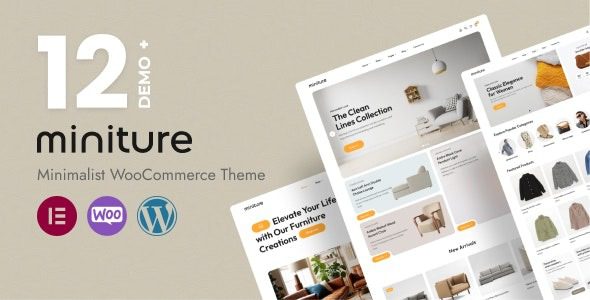
What Is the Miniture WordPress Theme? A Complete Solution for Minimalist Stores
The Miniture WordPress theme is a minimalist-style theme designed specifically for WooCommerce stores, launched by ecomnius. It focuses on Elementor front-end editing and real-time customization settings, making it suitable for home, fashion, and lifestyle brands, helping merchants organize product images, collections, and purchase entry points into clean pages. Unlike ordinary themes, Miniture emphasizes "content first," ensuring that key product information is fully presented while maintaining visual simplicity. When using the Miniture WordPress theme, it is recommended to first review whether product materials are complete, then plan whitespace and visual hierarchy, avoiding hiding necessary parameters and purchase instructions due to over-simplification.
What to Keep First in a Minimalist Layout? Key Points for Homepage and Navigation Design
The homepage should start with the main business direction and primary collections, displaying a small number of representative products. Brand images convey style, while collection names help users understand what is specifically being sold. Do not hide categories and purchase entry points too deeply for the sake of simplicity. It is recommended to first list the tasks customers need to complete (such as finding products, comparing specifications, adding to cart), then check whether each page element supports these tasks. Whitespace should help distinguish content, not make users lose track of the next step. When comparing different store structures through WordPress resource sites, you can use the same set of real products for testing. Home products require size and spatial references, while apparel requires specifications and wearing information. Only by inputting your own materials can you judge whether the layout is appropriate.
How to Fully Express Product Information on Clean Pages
Product titles directly state the product, summaries help understand main features, and the parameter section answers questions about size, material, and usage. Do not shrink all information into small, hard-to-read text, nor place brand stories before the purchase button. Clear sections allow users making quick selections to find key information and let users conducting in-depth research continue reading. Product images and text each serve their own purposes and cannot replace each other. Keep consistent fields for similar products so customers can compare more easily. Size units, material names, and specification order should not vary due to different editors. For out-of-stock or items requiring confirmation, the page status should be clearly expressed. It is recommended to first complete one path each with simple products and multi-variant products, checking selection, quantity, and order information, avoiding a situation where only a single demo item works properly.
- Visual information: Appearance, details, and proportions each have clear purposes.
- Selection information: Specification names correspond to images and prices.
- Delivery information: Packaging, shipping, or other arrangements are easy to find.
How Elementor and Customization Settings Divide Responsibilities
Miniture officially introduces Elementor and real-time customization options, suitable for adjusting pages and overall appearance in a visual interface. Global fonts, colors, and buttons should preferably follow unified rules, with individual pages adjusted only as necessary based on content. This way, as collections increase, the website will not gradually develop many inconsistent styles. When design expansion is needed, you can learn about Elementor Pro resources while avoiding multiple components repeatedly implementing the same effect. Reusable sections are suitable for carrying stable content, such as brand introductions or common service descriptions. However, product parameters and prices should come from actual product data, avoiding manual entry repeated across multiple independent areas. When updating pages, first check the data source and clarify which locations will be affected by changes. Minimalist style relies on unified details—title line breaks, image cropping, and button lengths are all worth checking under real Chinese materials.
How to Take Care of Both Shopping Cart and Mobile Reading
WooCommerce handles the actual store process, while the theme provides the display method. Payment, shipping, and inventory need to be configured according to business needs. During acceptance testing, go from the product page to the shopping cart and then to checkout, verifying options and amounts. After users return to continue browsing, they should also be able to understand their current selections. Clean pages should not omit necessary prompts, especially errors, out-of-stock notices, or fee changes—customers need to know what happened. On mobile, you can check categories, images, long descriptions, and specification selections. Large images should not push main information too far away, and floating components should not cover buttons. Uniform image proportions in lists help with continuous comparison; detail images in product pages can be arranged according to product needs. Checking loading and scrolling experience under normal network conditions is closer to actual customer usage than only previewing on a wide screen.
How to Keep Collections and Content Clear Long-Term
Brand articles can focus on purchasing guides, styling, or usage scenarios, then link to related collections. Content should answer real questions and does not need to be written as product promotion every time. Categories should remain stable, while special topics should be maintained according to actual products and campaigns, with old entry points cleaned up promptly after they end. When products are discontinued or information changes, check articles and recommendations simultaneously to avoid customers seeing contradictory statuses on different pages. Miniture is suitable for WordPress stores that want to put products at the visual center. First unify materials and the purchasing path, then use the editor to adjust whitespace and style—this allows minimalist design to serve actual usage. Customers being able to understand differences, select the right specifications, and complete purchases smoothly has more business value than pages simply looking emptier.
Frequently Asked Questions
How to install the Miniture theme?
In the WordPress admin, go to Appearance - Themes - Add New Theme, upload the Miniture theme ZIP file, and activate it. Before installation, please ensure the WooCommerce plugin is installed, and import demo content according to official documentation (if needed). For specific steps, please refer to the official documentation.
What types of stores is the Miniture theme suitable for?
Miniture is designed for home, fashion, and lifestyle brands. Its minimalist layout can highlight product images and collection information. It is also suitable for any WooCommerce store that wishes to present products with a clean visual style.
How compatible is the Miniture theme with Elementor?
Miniture officially supports Elementor front-end editing and real-time customization settings. You can use Elementor to visually adjust page layouts and global styles. It is recommended to use the latest version of Elementor for the best experience.
How often is the Miniture theme updated?
The theme update frequency depends on the release schedule of the development team ecomnius. For details, please refer to the official documentation or the theme page changelog. It is recommended to check for updates regularly to ensure compatibility and security.


Comments (0)